Distance-based shipping for WooCommerce
Charge delivery by distance, from your nearest store.
Nearship finds the customer's address on the map, picks the store or warehouse closest to them and prices delivery with your rules: distance bands, a price per km or mile, delivery areas you draw, and store pickup for everyone else.
- No Google key needed
- Block and classic checkout
- HPOS compatible
Bands: 0–5 km €2.90 · 5–10 km €4.90 · 10–25 km €1.20 per km · free from €60. Straight-line distance, worked out in your browser the same way the plugin does it.
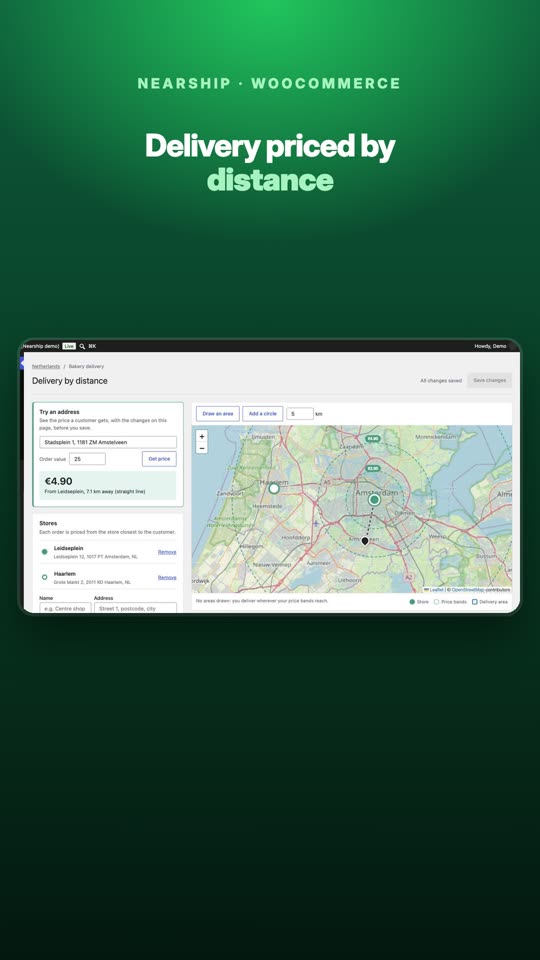
Fourteen seconds, real screens
Recorded in the demo store, no mock-ups. Here's what you're seeing.
- Try an address. The editor shows the price, the shop that ships and the distance before you save.
- Draw a delivery area and set prices by distance, flat or per km.
- Outside the area, checkout offers pickup at your shops with your own message.
The video plays from YouTube when you press play. Watch it on YouTube
A flat delivery fee is wrong for most of your customers
WooCommerce charges by zone: a whole postcode area or country pays one price. With more than one shop, or customers spread across a city, that overcharges some and undercharges others.
Zones and flat rates
- Next door and 20 km away pay the same
- One origin address, even if you have two shops
- No way to say "we deliver up to here" on a map
- Distance plugins on Google's legacy Distance Matrix API don't work on new Google projects
Nearship
- Prices by distance bands or per km, with base, minimum and maximum fees
- Each order priced from the closest shop, which is saved on the order
- Delivery areas drawn as polygons or circles
- OpenStreetMap by default; Google Routes API, Mapbox or openrouteservice for driving distance
How it works
It's a normal WooCommerce shipping method, so it sits in your zones next to Flat rate and Free shipping.
Add Nearship to a shipping zone
In WooCommerce › Settings › Shipping. Each zone gets its own shops, prices and areas.
Set it up on one page
Add shops by address, set your bands and draw where you deliver, with a map that updates as you type.
Customers get a price at checkout
The label names the shop and distance, for example "Bakery delivery from Haarlem (7.2 km)".
Inside the admin
One editor per shipping zone, under WooCommerce › Nearship. These are screenshots of the demo store, which you can log in to.
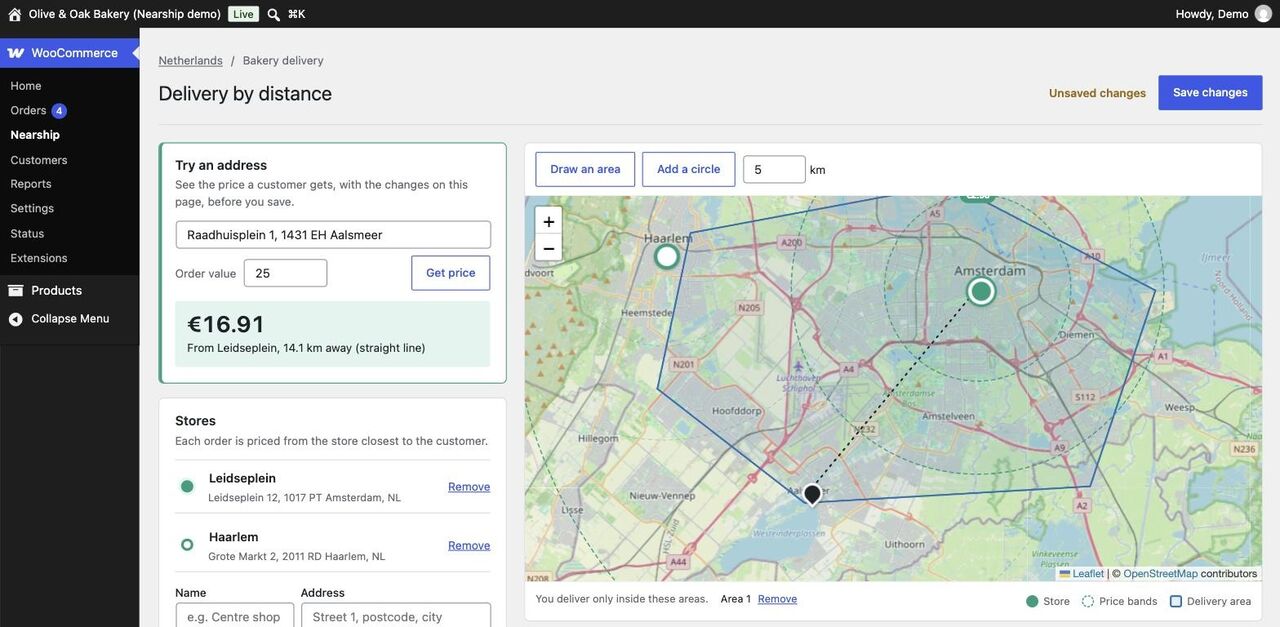
Shops, prices and a map on one page
Instead of a cramped settings popup, each zone has a full-page editor. Test any address against your unsaved changes.
- Add shops by address, drag the pin to fine-tune
- The price, shop and distance for any address
- Warns before you leave with unsaved changes
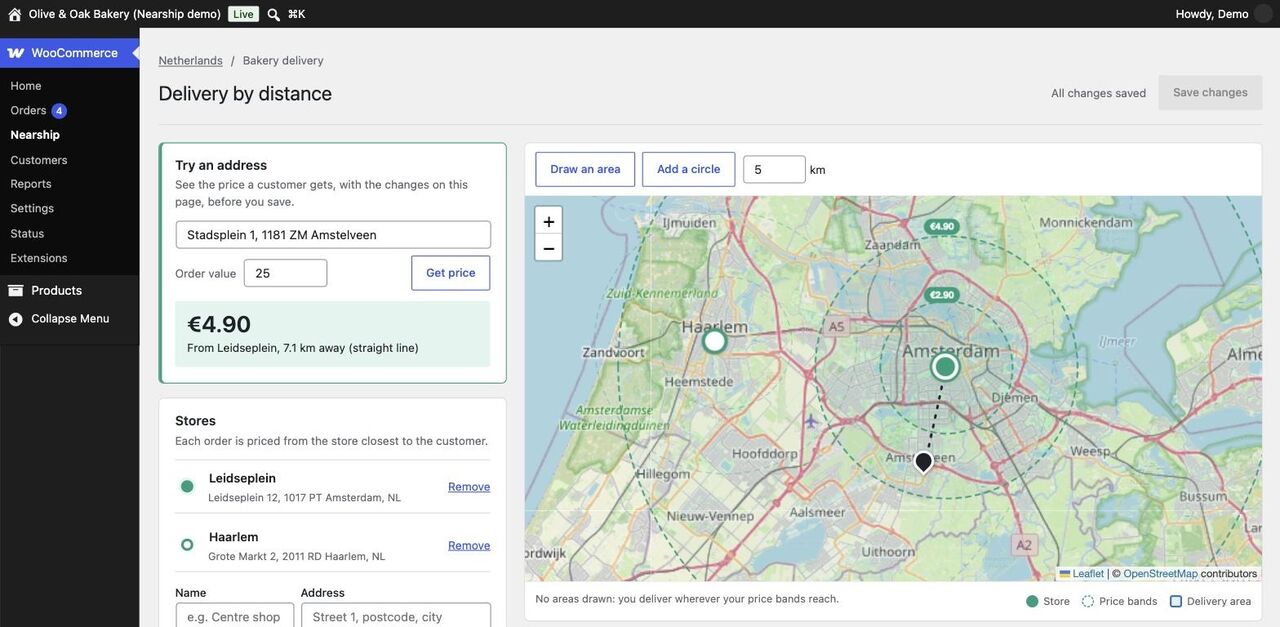
Prices by distance
Bands with a flat price or a price per km or mile. Gaps and overlaps between bands are flagged as you type.
- Base fee, minimum and maximum fee
- Free delivery from an order value
- Beyond the last band, delivery isn't offered
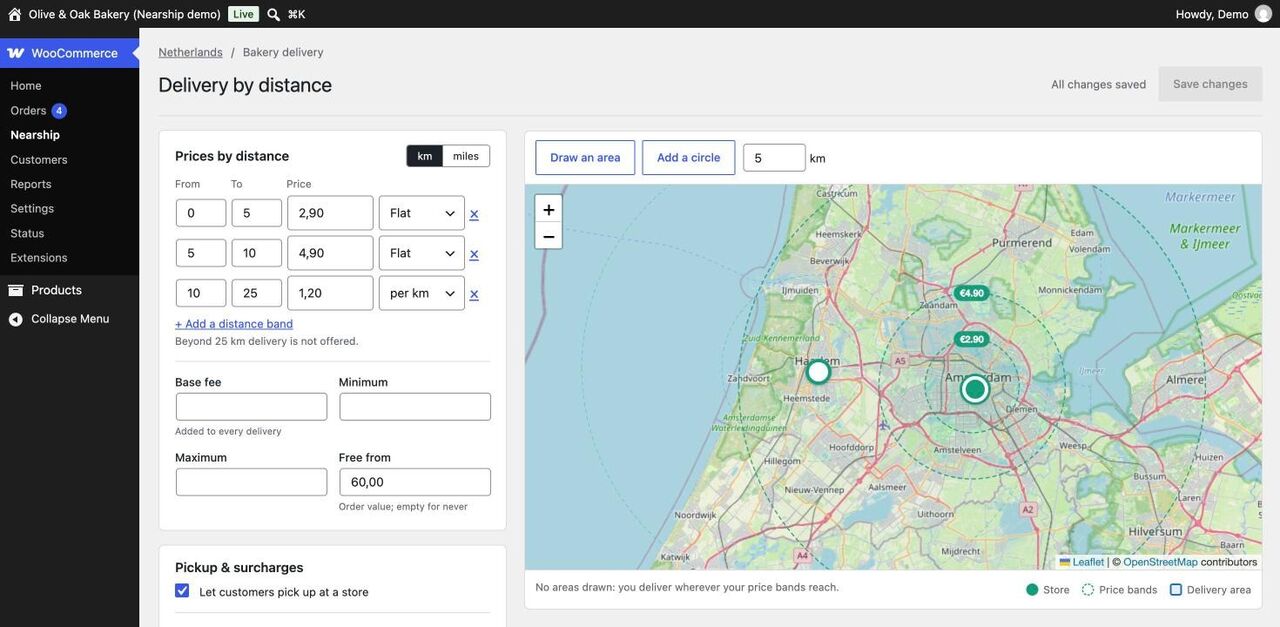
Draw where you deliver
Polygons or circles on the map. Only addresses inside an area get delivery. Drawing areas uses no paid API.
- Several areas per zone
- Circles by radius, polygons point by point
- Area check runs before any route lookup
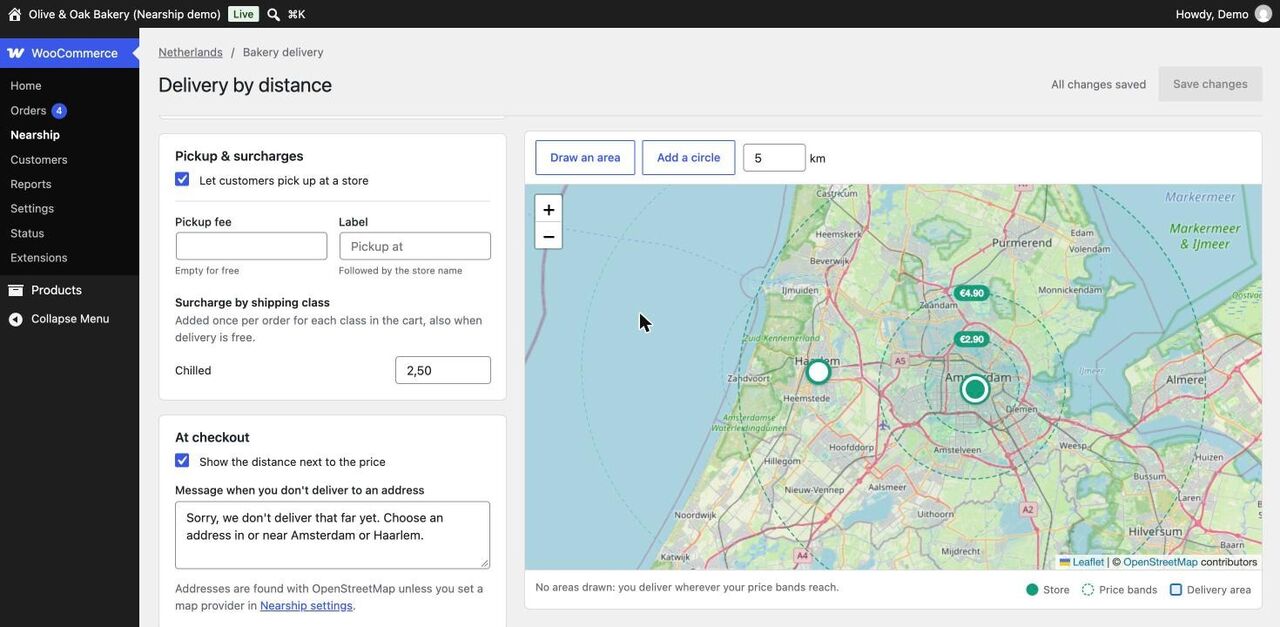
Pickup, surcharges, your message
Offer "Pickup at" each shop, nearest first, free or with a fee. Customers outside your area still get pickup, with your message under it.
- Surcharge per shipping class, e.g. chilled items
- Show the distance next to the price
- Your own text for addresses you don't deliver to
Pick a map provider, or none
OpenStreetMap works out of the box with straight-line distance. Add a key for driving distance, and check it before you save.
- Google (Geocoding + Routes API), Mapbox, openrouteservice
- Every address and route cached for 30 days
- If a provider fails, it falls back to straight line
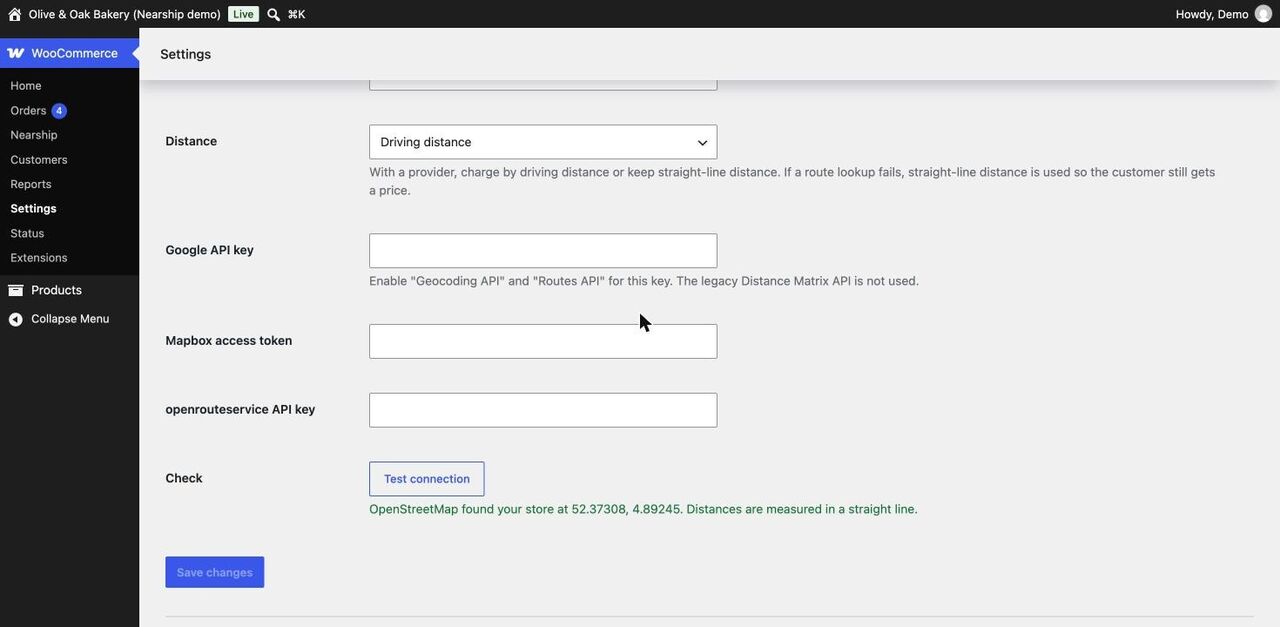
Admin demo: log in with demo / NearshipDemo! (read-only; Try an address and Test connection work).
What your customers and orders show
The shop and distance appear at checkout, and the order keeps them, so you know who ships it.
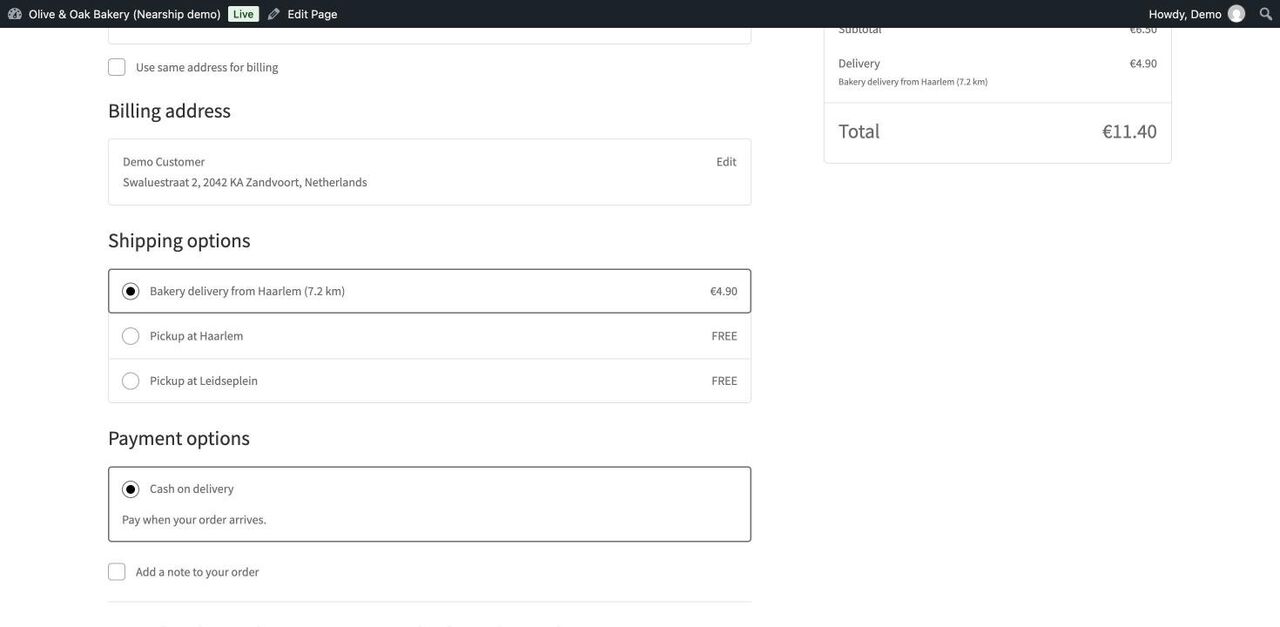
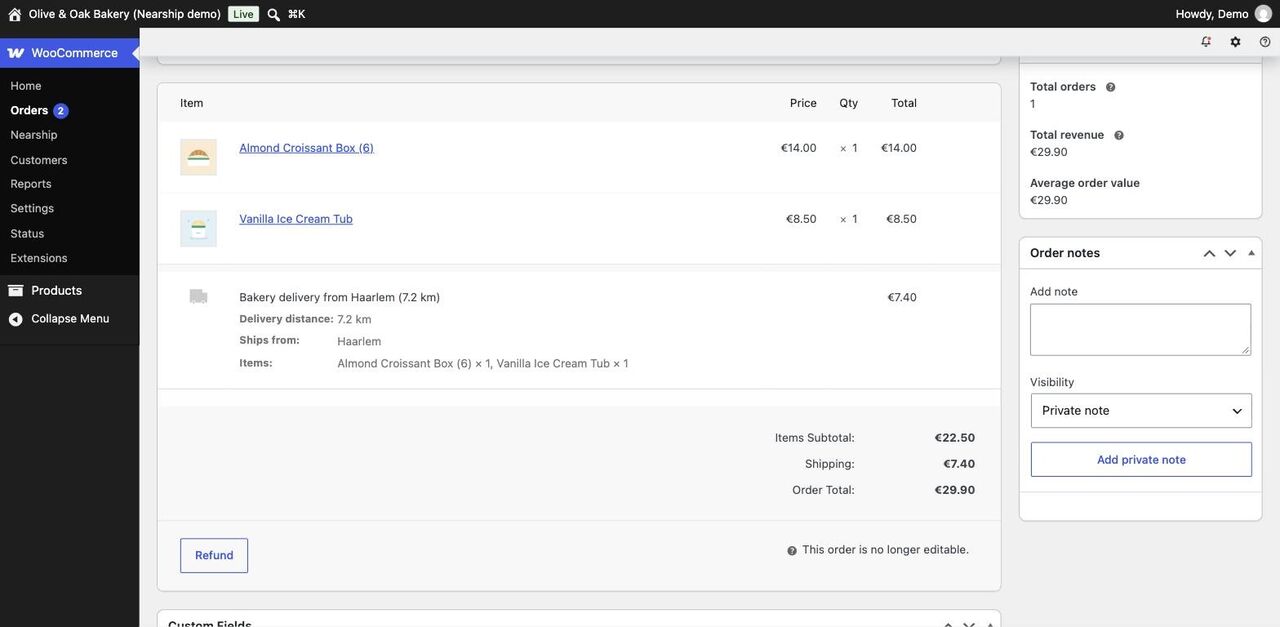
Also in the box
Built for the WooCommerce you run today.
Block and classic checkout
Works with the Cart and Checkout blocks and the classic shortcode checkout.
HPOS compatible
Distance and shop are saved on the shipping line with WooCommerce's order storage.
Kilometres or miles
Switch the unit per zone; per-unit prices follow.
Looked up once
Addresses and routes are cached for 30 days, so a returning customer costs no extra lookups.
No wrong prices
An address that can't be found gets no delivery price rather than a guessed one.
Translation ready
Every string is translatable and a .pot file is included. Uninstall removes all its data.
Nearship has no subscription and no service of its own. Google, Mapbox and openrouteservice may charge for usage under their own pricing; you sign up with them and pay them directly. Without a key, Nearship uses OpenStreetMap's free Nominatim service at one request per second.
One payment, no subscription
Buy it direct from us, or on CodeCanyon if you already shop there. It is the same plugin.
Buy direct
One WordPress site. No subscription.
- The full plugin, GPL source
- 1 year of updates and email support
- Licence key and download link by email within a minute
- 30-day refund
Also on CodeCanyon
Envato's Regular ($35) and Extended ($224) licences, with 6 months of support through CodeCanyon.
- The same plugin
- Future updates
- Support via the CodeCanyon item page
- Envato's terms and refund policy
Prices in US dollars, excluding tax. Direct purchases are sold by Paddle.com as Merchant of Record, which issues the invoice and handles VAT and refunds. Terms: licence · 30-day refund policy.
Questions
Something else? Read the documentation or log in to the admin demo and try it.
Do I need a Google API key?
No. Out of the box Nearship finds addresses with OpenStreetMap and measures straight-line distance. Google, Mapbox and openrouteservice are optional, for driving distance.
Will a map provider cost me money?
It can. Providers bill you directly under their own pricing and free tiers. Nearship caches every address and route for 30 days, and only routes to the three closest shops, so the number of lookups doesn't grow with more shops.
What happens if my key stops working?
Nearship falls back to OpenStreetMap and straight-line distance, so the customer still gets a price. "Test connection" in the settings tells you whether a key works.
What does a customer outside my area see?
No delivery option, your own message, and pickup at your shops if you turned pickup on.
Does it work with the new checkout?
Yes, with the WooCommerce Cart and Checkout blocks and with the classic checkout. It's also compatible with HPOS order storage.
What do I need?
WordPress 6.5 or newer, WooCommerce 8.0 or newer and PHP 7.4 or newer.
Where do I get support?
Bought here: email support@webkoding.com with your licence key. Bought on CodeCanyon: use the Support tab on the item page. Either way, include your WordPress, WooCommerce and PHP versions and the address you tested.
Charge what the delivery actually costs
Pick a scenario in the demo store and check out. Then log in to the admin demo and see how it's set up.